Copyright © 2025, J.R.Goodenough
, J. R. Goodenough
Screen shots 6
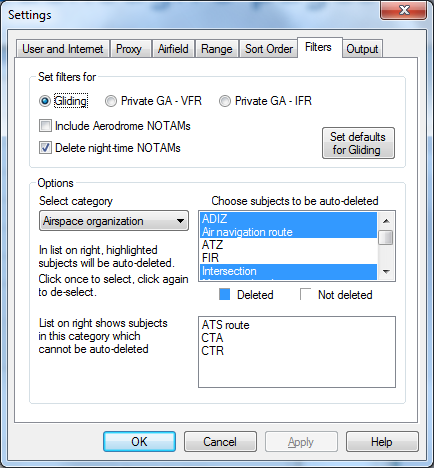
Spine’s ability automatically to filter NOTAMs based on their relevance to the pilot is one of its most powerful features.
You use the Filters tab to set which types of NOTAM Spine will exclude from the output.
A set of defaults is applied, depending on whether you are a glider pilot, or a private GA pilot flying under either VFR or IFR. You can override the defaults for each NOTAM category by clicking in the upper list in the Options section.
Some subjects cannot be auto- deleted for safety reasons, and these are shown in the lower list.
Note: Aerodrome NOTAMs, if included, add considerably to the number of NOTAMs Spine needs to process. They are not needed by glider pilots. They may or may not be needed by GA pilots.
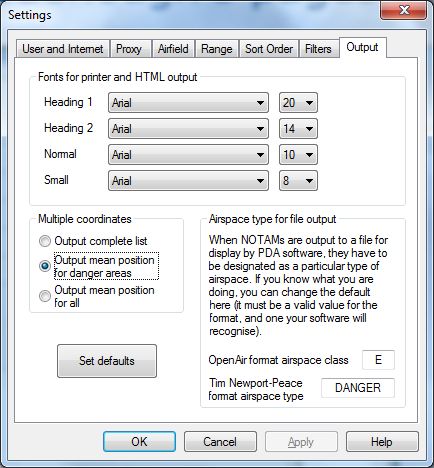
On the Output page you can change the fonts that Spine uses, and, if there is a list of coordinates, just output a single, mean position.
However, even if you just print a mean position (which is the centre of the area covered), if Spine is calculating the distance from your home airfield, the nearest point of the area is used.
(This is similar to the case when a NOTAM refers to a single point with a radius of influence: here the distance is calculated to the edge of the circle.)
This page also allows you to customise the output to the special files used by in-flight computers, if required.